

H5P activities
What is H5P?
H5P is an HTML-based, open-source software that is integrated as an activity type on Moodle. Its user-friendly interface empowers instructors to create their own engaging learning materials for active learning. H5P can be used for presentation of content, practicing concepts learned in class and even assessing students’ learning throughout the course through formative or summative assessment.
Because of H5P’s open-access nature, activities can be either created from scratch or remixed from existing ones respecting the Creative Commons license of the content. See more in the Reusing existing content section.
Instructional relevance
H5P activities are best suited for presentation of content, practice and formative (informal) assessment.
Note that H5P activities can be edited by the Creator after they have been shared. Additionally, H5P is not currently integrated with the Moodle gradebook.
Types of H5P activities
Below is a list of common H5P activities and some ideas for pedagogical applications. For demonstration and technical support, H5P has a robust online repository and community forum, see H5P support section below for more.
You can also consult Stuart Melor’s H5P periodic table, which outlines all H5P activity types, how much work it takes to create them and suitable applications.
Interactive video
Add multiple-choice, fill-in-the-blank questions, pop-up text and other forms of interactivity to your videos.
Example: Gut Microbiome Video Quiz by Dylan Parks
Ideas include: an interactive recorded lecture with knowledge checks, or a video rubric where you verbally explain your assessment criteria to students.
Branching scenario
Create self-paced learning scenarios with multiple choices and outcomes, and other forms of adaptive learning content with video, image, or text elements and scoring capabilities.
Example: Thank Goodness it’s Saturday! by Concordia Lab for Innovation in Teaching and Learning
Ideas include: a choose-your-own adventure, case study simulations, priming tool or pre-assessment. You can assign scores to the various answers, adjust the number of attempts student can make. On Moodle, each students’ choices are logged which can feed into a discussion after.
Documentation tool
Guide students through a structured, step-by-step writing or reflection process. At the end, students can then export all their answers as a document.
Example: Change agent self-assessment tool by Concordia Centre for Teaching and Learning
Ideas include: Reflective writing or self-assessment, guided notetaking, guided brainstorming tool for drafting.
Reusing existing H5P activities
Many H5P activities adopt a Creative Commons license, allowing others to reuse or remix existing activities rather than creating from scratch. You can search for existing H5P activities in eCampus Ontario’s H5P Catalogue (most content is license under CC-BY-NC-SA 4.0 License) or by browsing the OER Commons.
To learn more about how CC licenses work, visit the Library’s page on CC License and OER.
Peer teaching using H5P
Allowing students to create their own H5P activities can be a great way to engage in another active learning strategy of peer teaching. Peer teaching has been shown to deepen students’ understanding of the materials and promote more engagement in their learning and studying (Stigmar, 2016). By asking students to apply what they’ve learned and design their own interactive learning activities and teach their peers, you can empower them to co-construct their knowledge in a more meaningful and active way.
For example, you can split the class into small groups and ask them to create H5P activities on a specific topic or learning outcome to present content or practice concepts. Your role of the instructor would be to create a structured rubric and clear assignment instructions, having check-ins with the students and possibly integrating peer evaluation.
To allow students to create their own H5P activities in Moodle, in the class list you must change their role to ‘H5P Creator’.
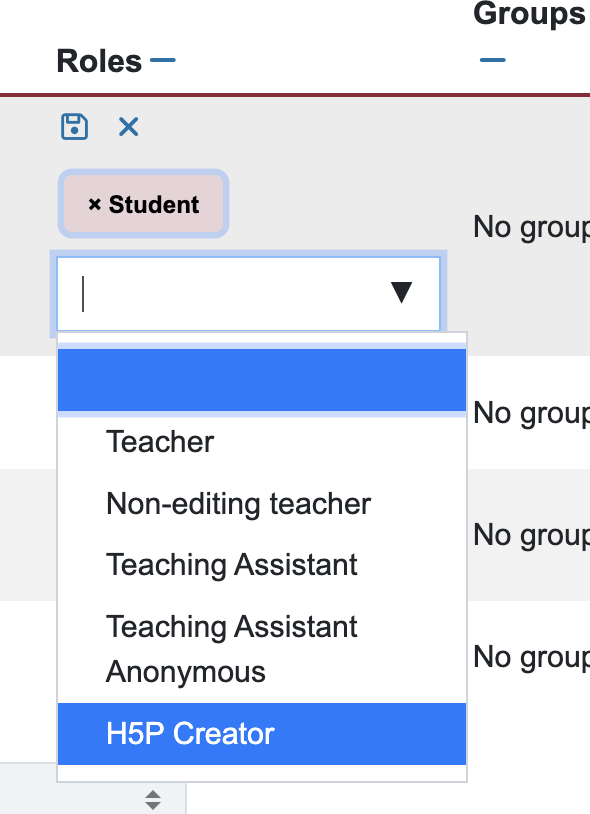
Students can then create their own H5P activities by going to ‘Content bank’ in Moodle. Activities in the content bank are private to the user until they are shared. You can ask your students to share their completed H5P activities and comment on each other’s by creating a Forum activity on Moodle.
Get support for H5P
Note: Technical support for H5P is currently limited, please consult the tutorials, documentation, and forums referenced on the page for more detailed guidance.
Have an idea for an activity or assessment?
Book a consultation with the CTL: teaching@concordia.ca
Have technical issues within Moodle?
Contact IITS help@concordia.ca
References
Stigmar, M. (2016). Peer-to-peer Teaching in Higher Education: A Critical Literature Review. Mentoring & Tutoring: Partnership in Learning, 24(2), 124–136. https://doi-org.lib-ezproxy.concordia.ca/10.1080/13611267.2016.1178963