

Phishing emails at Concordia
Phishing emails pretend to be from a trusted source (i.e. a bank, Concordia, or a social media site) so they can trick users into providing confidential and private information. These emails often encourage users to fill out forms or click on links that appear real but are fraudulent.
Examples of phishing emails that have circulated at Concordia
- Year-end sale / holiday promotion emails with suspicious links
- Fake HR year-end feedback or survey requests
- Year-end forms asking for personal or login information
- Gift card or reward emails urging urgent action
- Delivery / shipment notifications for packages that you did not order
Example 1
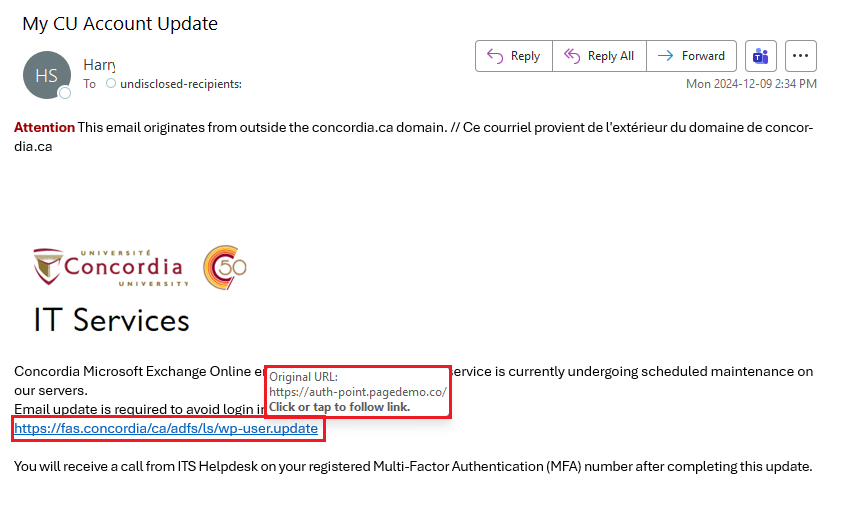
- This email claims to be from IITS, but Outlook flags it as coming from outside concordia.ca; a true email from IITS would be from the concordia.ca domain.
- Hover over a link to see its true url: a spam domain is visible.
Example 2

- If you know the sender, contact them to verify if the link is real.
- If you do not know the recipient, do not click the link. Report it to IITS.
- Hover over the VIEW YOUR RECEIPT button to see the true link.
Example 3
 Note the spelling error in the subject and generic greeting
If you do not know the sender, do not click the link and report it.
Note the spelling error in the subject and generic greeting
If you do not know the sender, do not click the link and report it.
- Note the spelling error in the subject ("Extra Fedback") and generic greeting.
- If you do not know the sender, do not click the link and report it.
What can I do to stay cautious and avoid phishing?
- Hover over a sender’s email address with a cursor. It can reveal inconsistencies with the name of the sender.
- Think twice about opening emails with a generic greeting, rather than your name.
- Only open emails from trusted senders.
- Don’t click on links or attachments unless you’re expecting them.
- If you’re contacted by a company with which you don’t do business, consider that the email may be phishing or spam.
- Watch for mistakes in titles or content.
- To safely examine suspicious URLs or attachments, use VirusTotal.com.
- To open suspicious links in a secure setting, use browser sandboxes such as Browserling.com.
- Use Outlook's "Report Phishing" feature to report a suspicious email right away, and then report it to the Service Desk and then delete them.